Implante o MoreLogin em um servidor Ubuntu headless e automatize perfis de navegador pela Local API — sem ambiente gráfico.
Ao final deste guia você terá:
- A running MoreLogin instance on an Ubuntu 24.04 headless server
- Encaminhamento de rede configurado para que máquinas externas possam conectar via CDP (Chrome DevTools Protocol)
- Um script de automação Python funcional que cria, inicia, controla e limpa perfis de navegador
┌──────────────────────────────────────────────────────────┐
│                    Ubuntu 24.04 Server                   │
│                                                          │
│  ┌──────────────┐    ┌───────────────────────────────┐   │
│  │   xvfb       │───▶│  MoreLogin AppImage           │   │
│  │ (virtual     │    │  Local API :40000             │   │
│  │  display)    │    │  CDP debug :<dynamic>         │   │
│  │              │    │    (127.0.0.1, per profile)   │   │
│  └──────────────┘    └───────────────────────────────┘   │
│                              │                           │
│                        socat forwarding                  │
│                              │                           │
│                     0.0.0.0:40001 → 127.0.0.1:40000      │
│                     0.0.0.0:<N+1> → 127.0.0.1:<N>        │
└──────────────────────────────────────────────────────────┘
                               │
                          External machine
                     (Playwright / Puppeteer / Selenium)
[!NOTE] A porta de depuração CDP é dinâmica — cada perfil de navegador recebe a sua própria porta, retornada pela resposta de
/api/env/start.
| Requisito | Detalhes |
|---|---|
| Sistema operacional | Ubuntu 24.04 Server (x86_64) |
| Especificações recomendadas | 8 vCPU, 8 GB RAM (supports ~5 concurrent profiles) |
| Rede | Acesso de saída à Internet; open inbound port 40001 and the forwarded CDP ports you choose, or use SSH tunnels instead |
| Python (opcional) | Python 3.8+ with pip for running the example script |
Conecte-se ao servidor por SSH e instale os pacotes necessários:
# FUSE support (required for AppImage)
sudo apt install -y libfuse2t64

# GTK / accessibility / display libraries
sudo apt install -y libatk1.0-0 libatk-bridge2.0-0 libatspi2.0-0
sudo apt install -y libcups2
sudo apt install -y libgtk-3-0 libgdk-pixbuf2.0-0
sudo apt install -y libgbm1 libxkbcommon0 libasound2t64

# Virtual framebuffer (headless display)
sudo apt install -y xvfb

# TCP forwarder
sudo apt install -y socatSe as páginas do navegador aparecerem sem texto ou com caracteres faltando, instale os pacotes de fontes correspondentes:
# CJK (Chinese, Japanese, Korean)
sudo apt install -y fonts-noto-cjk fonts-noto-cjk-extra

# Arabic
sudo apt install -y fonts-noto-color-emoji fonts-noto-extra
Para outros idiomas, instale o pacote correspondente da família de fontes Noto.
wget https://get.morelogin.com/client/prod/linux/x64/2.54.0/MoreLogin_x86_64_2.54.0.AppImage
chmod +x MoreLogin_x86_64_2.54.0.AppImage
Substitua
2.54.0pela versão mais recente disponível na sua conta MoreLogin ou na página de download.
Use xvfb-run para fornecer um display virtual e então execute o AppImage:
nohup xvfb-run -a ./MoreLogin_x86_64_2.54.0.AppImage --no-sandbox > morelogin.log 2>&1 &Verifique se foi iniciado com sucesso:
# Check the process is running
ps aux | grep MoreLogin
O processo pode levar de 5 a 10 segundos para inicializar por completo.
[!CAUTION] Você deve fazer login antes de chamar qualquer outro endpoint da API local. Em um servidor headless, não há GUI para fazer login manualmente, portanto, você deve autenticar por meio da API. Sem esta etapa, todas as chamadas de API retornarão:
{"status": "error", "code": 401, "message": "Your login status has expired, please log in again"}
Abra o cliente desktop do MoreLogin (em qualquer máquina onde você esteja conectado) e vá em Configurações → API e MCP.
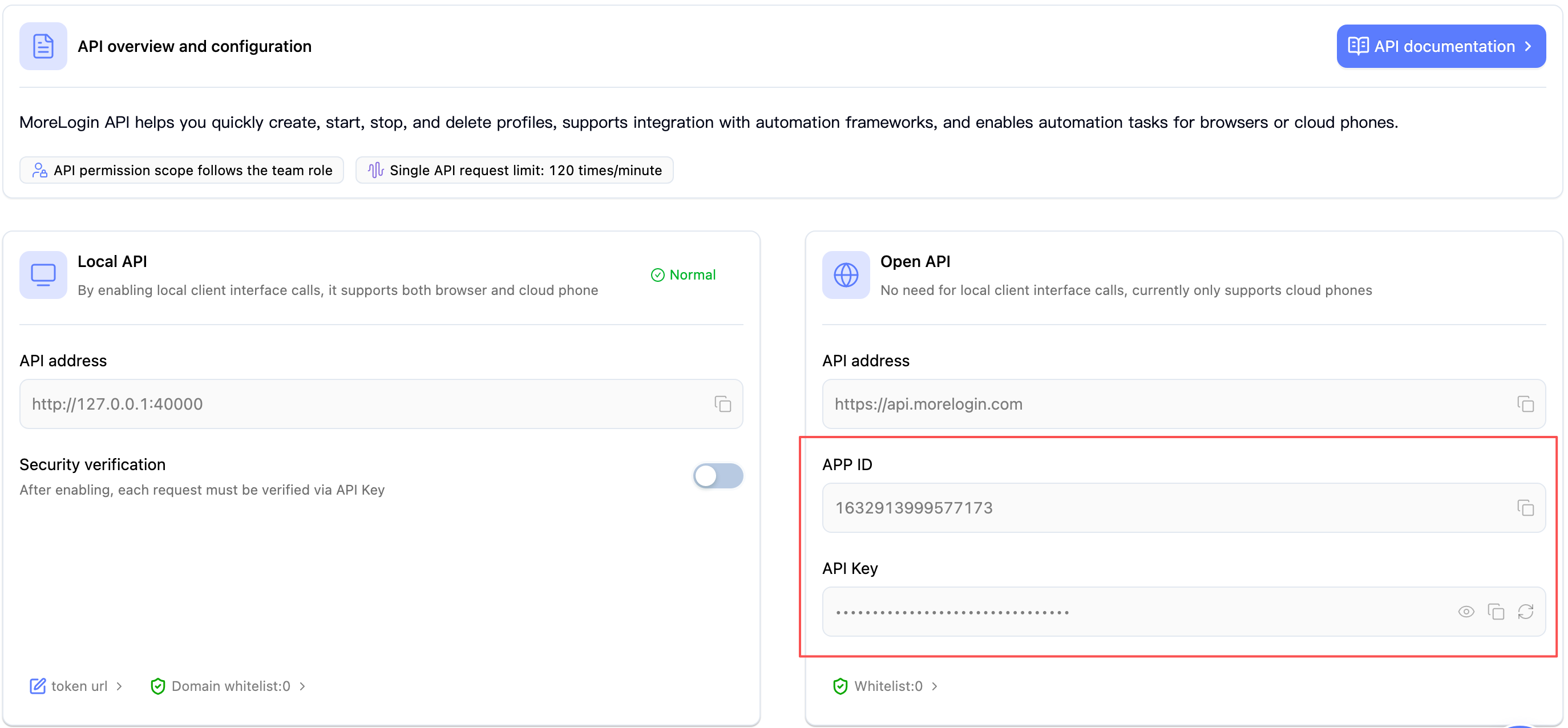
Chame o endpoint de login com suas credenciais:
curl -X POST http://127.0.0.1:40000/api/user/login \
  -H "Content-Type: application/json" \
  -d '{
    "apiId": "YOUR_APP_ID",
    "apiKey": "YOUR_API_KEY"
  }'
Uma resposta bem-sucedida é semelhante a:
{"code": 0, "msg": null, "data": true}Confirme que a API está pronta listando os perfis de navegador:
curl -s -X POST http://127.0.0.1:40000/api/env/page \
  -H "Content-Type: application/json" \
  -d '{"pageNo": 1, "pageSize": 1}'
Uma resposta
{"code":0, ...}significa que você está autenticado e a API está pronta.
Ponto de verificação: seu servidor MoreLogin está totalmente operacional. Siga para o Passo 4.
[!NOTE] A sessão de login persiste enquanto o processo do MoreLogin estiver em execução. Se você reiniciar o AppImage, precisará autenticar novamente.
Por padrão, tanto a Local API (:40000) quanto as portas de depuração CDP escutam em 127.0.0.1. Se você precisa acessá-las de fora, encaminhe as portas.
[!WARNING] Risco de segurança — não exponha essas portas à internet pública.
- A Local API não tem autenticação embutida na maioria dos endpoints.
- Uma porta de depuração CDP concede controle remoto total da instância do navegador (ler cookies, injetar scripts, capturar tela).
Recomendações:
- Use um túnel SSH em vez do socat para acesso remoto:
ssh -L 40000:127.0.0.1:40000 user@server- Se precisar usar o socat, restrinja o acesso com regras de firewall a IPs específicos apenas
- Use uma VPN ou grupos de segurança do provedor de nuvem para limitar o tráfego de entrada
- Nunca abra as portas
40001/ portas CDP para0.0.0.0em um servidor exposto à internet sem restrição de IP
nohup socat TCP-LISTEN:40001,fork,reuseaddr,bind=0.0.0.0 TCP:127.0.0.1:40000 &Máquinas externas agora podem alcançar a API em
http://<server-ip>:40001.
When you start a browser profile via the API, the response includes a dynamic debugPort (e.g., 9222). Cada perfil pode receber uma porta diferente. Forward it so external automation tools (Playwright, Puppeteer, Selenium) can connect:
# Example: if debugPort=9222, forward to external port 9223 (debugPort + 1)
# Adjust both ports to match the actual debugPort returned by /api/env/start
nohup socat TCP-LISTEN:9223,fork,reuseaddr,bind=0.0.0.0 TCP:127.0.0.1:9222 &
[!WARNING] Ao executar vários perfis simultaneamente, garanta que as portas encaminhadas não colidam com as portas de depuração de outros perfis.
[!TIP] Em produção, crie o encaminhamento socat dinamicamente após cada chamada de
/api/env/start, usando odebugPortretornado.
Se os scripts de automação rodam no mesmo servidor, você pode dispensar o socat e conectar direto em
127.0.0.1.
Se você usar o socat, restrinja o acesso apenas a IPs confiáveis:
# Allow only a specific IP (recommended)
sudo ufw allow from <YOUR_IP> to any port 40001 proto tcp
sudo ufw allow from <YOUR_IP> to any port 9223 proto tcp

# Or allow from any IP (NOT recommended for production)
# sudo ufw allow 40001/tcp
# sudo ufw allow 9223/tcpPara o acesso remoto mais seguro, use um túnel SSH — sem mudanças de firewall nem socat.
Como a porta CDP é dinâmica (atribuída quando você inicia um perfil), o fluxo é:
Túnel a porta da API primeiro:
# Run this on your local machine
ssh -L 40000:127.0.0.1:40000 user@<server-ip>
Inicie o perfil pela API tunelada (
http://127.0.0.1:40000/api/env/start) e leia odebugPortretornado.Abra um segundo túnel para a porta CDP:
# Replace <debugPort> with the actual port returned by the API
ssh -L <debugPort>:127.0.0.1:<debugPort> user@<server-ip>
Conecte em
http://127.0.0.1:<debugPort>a partir dos seus scripts Playwright / Puppeteer, como se o servidor fosse local.
[!TIP] Você pode combinar os dois túneis em um único comando se souber a faixa de portas com antecedência, por exemplo:
ssh -L 40000:127.0.0.1:40000 -L 9222:127.0.0.1:9222 -L 9223:127.0.0.1:9223 user@<server-ip>Mas na prática é mais fácil abrir primeiro o túnel da API e depois adicionar túneis por perfil conforme necessário.
Abaixo está um exemplo mínimo em Python mostrando o ciclo de vida completo de um perfil de navegador. Para o script de produção completo, veja o repositório de demos.
pip install requests playwrightO Playwright é usado aqui apenas pelo seu cliente CDP (
connect_over_cdp). Você não precisa executarplaywright install.
No Linux Server, o mecanismo do navegador deve ser executado com a flag --no-sandbox. Você passa este parâmetro através do campo startupParams ao criar ou atualizar um perfil de navegador.
[!CAUTION] Sem
--no-sandbox, o navegador não conseguirá iniciar na maioria dos ambientes de servidor Linux (especialmente ao executar comorootou sem uma sessão de desktop completa).
Use /api/env/create/advanced para criar um perfil com startupParams (o endpoint /api/env/create/quick não suporta este campo):
curl -X POST http://127.0.0.1:40000/api/env/create/advanced \
  -H "Content-Type: application/json" \
  -d '{
    "browserTypeId": 1,
    "operatorSystemId": 5,
    "startupParams": ["--no-sandbox"]
  }'
[!TIP] Se você usou
/api/env/create/quickpara criar o perfil, chame/api/env/updatepara adicionar--no-sandboxantes de iniciar — veja abaixo.
Se você já possui perfis de navegador criados sem --no-sandbox, atualize-os antes de iniciar:
curl -X POST http://127.0.0.1:40000/api/env/update \
  -H "Content-Type: application/json" \
  -d '{
    "envId": "YOUR_ENV_ID",
    "startupParams": ["--no-sandbox"]
  }'
[!NOTE] O campo
startupParamsaceita um array de strings. Você também pode incluir outras flags do Chrome (por exemplo,["--no-sandbox", "--disable-gpu"]). A flag--no-sandboxé necessária apenas no Linux — perfis Windows e macOS não precisam dela.
Este exemplo pressupõe que o script roda no mesmo servidor que o MoreLogin. Para cenários remotos, veja as observações abaixo.
import requests
from playwright.sync_api import sync_playwright

# ── Configuration ──────────────────────────────────────────
# Local:  script runs on the SAME server as MoreLogin
# Remote: script runs on a DIFFERENT machine — see notes below
API_BASE  = "http://127.0.0.1:40000"


# ① Create a browser profile
resp = requests.post(f"{API_BASE}/api/env/create/quick", json={
    "browserTypeId": 1,
    "operatorSystemId": 5,
    "quantity": 1
})
resp_data = resp.json()
assert resp_data["code"] == 0, f"Create failed: {resp_data}"
env_id = resp_data["data"]["envIds"][0]
print(f"✅ Created profile: {env_id}")


# ①-b Add --no-sandbox (required on Linux Server)
resp = requests.post(f"{API_BASE}/api/env/update", json={
    "envId": env_id,
    "startupParams": ["--no-sandbox"]
})
resp_data = resp.json()
assert resp_data["code"] == 0, f"Update failed: {resp_data}"
print(f"✅ Set --no-sandbox for profile: {env_id}")


# ② Start the profile (headless)
resp = requests.post(f"{API_BASE}/api/env/start", json={
    "envId": env_id
})
resp_data = resp.json()
assert resp_data["code"] == 0, f"Start failed: {resp_data}"
debug_port = resp_data["data"]["debugPort"]   # Dynamic — different for each profile
print(f"✅ Started — debug port: {debug_port}")


# ③ Build the CDP URL
cdp_url = f"http://127.0.0.1:{debug_port}"


# ④ Connect via CDP and automate
with sync_playwright() as p:
    browser = p.chromium.connect_over_cdp(cdp_url)
    page = browser.contexts[0].pages[0]
    page.goto("https://www.google.com")
    page.screenshot(path=f"screenshot_{env_id}.png")
    print(f"✅ Screenshot saved")
    # Use disconnect() — not close() — to detach without killing the browser.
    # The profile will be stopped cleanly via the API in step ⑤.
    browser.disconnect()


# ⑤ Stop the profile
requests.post(f"{API_BASE}/api/env/close", json={"envId": env_id})
print(f"✅ Profile stopped")


# ⑥ Delete the profile
requests.post(f"{API_BASE}/api/env/remove", json={"envIds": [env_id]})
print(f"✅ Profile deleted")
[!NOTE] Running from a remote machine? Two approaches:
Opção A — túnel SSH (recomendado): Configure túneis SSH da sua máquina local para o servidor (consulte § 4.4) e mantenha
API_BASE = "http://127.0.0.1:40000"ecdp_url = f"http://127.0.0.1:{debug_port}"— o SSH faz com que as portas remotas pareçam locais.Opção B — socat no servidor: No servidor, inicie o encaminhamento socat para a porta da API e para cada porta CDP:
# Execute isto no SERVIDOR, não na sua máquina local
socat TCP-LISTEN:40001,fork,reuseaddr,bind=0.0.0.0 TCP:127.0.0.1:40000 &
socat TCP-LISTEN:$((debug_port+1)),fork,reuseaddr,bind=0.0.0.0 TCP:127.0.0.1:$debug_port &
Then in your script, set
API_BASE = "http://<server-ip>:40001"andcdp_url = f"http://<server-ip>:{debug_port + 1}". ⚠️ Restrinja o acesso com regras de firewall — veja § 4.3.
[!IMPORTANT] The
resp.json()["data"]["envIds"]structure matches the current/api/env/create/quickresponse format. Se você encontrar um formato diferente (por exemplo,data: ["id1", ...]), verifique a Referência da API da sua versão. Os formatos de resposta podem variar entre as versões.
Os resultados a seguir foram obtidos em uma VM Ubuntu 24.04 Server (8 vCPU, 8 GB de RAM) usando o script completo de teste de estresse.
| Métrica | Valor |
|---|---|
| Total de corridas | 100 |
| Simultaneidade | 4 (simultâneo) |
| Taxa de sucesso | 100,0% |
| Tempo total | 604,06s |
| Tempo médio por tarefa | 6,04s |
| Rendimento | 0,17 tarefas/s |
Esses números servem como base. Actual performance depends on server specs, network conditions, and page complexity.
Em servidores de produção, execute o MoreLogin como um serviço systemd para ter inicialização automática no boot e reinício em caso de falha.
sudo tee /etc/systemd/system/morelogin.service > /dev/null <<'EOF'
[Unit]
Description=MoreLogin Browser (headless)
After=network-online.target
Wants=network-online.target

[Service]
Type=simple
User=root
WorkingDirectory=/opt/morelogin
ExecStart=/usr/bin/xvfb-run -a /opt/morelogin/MoreLogin_x86_64_2.54.0.AppImage --no-sandbox
Restart=on-failure
RestartSec=10
StandardOutput=journal
StandardError=journal

[Install]
WantedBy=multi-user.target
EOF
Ajuste os caminhos de
WorkingDirectoryeExecStartpara onde você colocou o AppImage.
[!TIP] Para produção, considere criar um usuário dedicado (por exemplo,
morelogin) em vez de executar comoroote ajuste a propriedade e as permissões do arquivo de acordo. Se o AppImage atualmente exigir privilégios de root, você poderá manterUser=root, mas isolar o processo em uma conta não root é uma prática recomendada.
sudo systemctl daemon-reload
sudo systemctl enable morelogin    # Auto-start on boot
sudo systemctl start morelogin # Start nowsudo systemctl status morelogin # Check status
sudo journalctl -u morelogin -f # Stream logs
sudo systemctl restart morelogin # Restart
sudo systemctl stop morelogin # Stop[!NOTE] Após um reinício, você precisa chamar o endpoint de login novamente — a sessão da API não sobrevive ao reinício.
AppImages require FUSE to run.Correção: Instale o suporte FUSE:
sudo apt install -y libfuse2t64Correção: instale o pacote de fontes do idioma desejado (veja Passo 1 — Instalar fontes).
Cause: CDP debug ports bind to 127.0.0.1 by default.
Correção: configure o encaminhamento socat (veja Passo 4) e garanta que o firewall permita a porta.
Causa: o MoreLogin ainda não terminou de iniciar, ou o processo travou.
Correção:
- Aguarde 5 a 10 segundos após a inicialização
- Verifique se há erros no
morelogin.log - Verifique se o processo está em execução:
ps aux | grep MoreLogin
{"status": "error", "code": 401, "message": "Your login status has expired, please log in again"}Causa: você não fez login pela API, ou o processo do MoreLogin foi reiniciado.
Correção: chame o endpoint de login antes de qualquer outra chamada de API (veja Passo 3).
| Objetivo | Ligação |
|---|---|
| Referência completa da API do navegador | API do navegador |
| Configuração de autenticação | Guia de autenticação |
| Exemplos de dramaturgo / selênio / titereiro | Exemplos de automação |
| Script completo de teste de estresse do Linux | GitHub — linux_server_test.py |
| Início rápido da CLI | Guia CLI |