Deploy MoreLogin on a headless Ubuntu server and automate browser profiles via the Local API — no desktop environment required.
By the end of this guide you will have:
- A running MoreLogin instance on an Ubuntu 24.04 headless server
- Network forwarding configured so external machines can connect via CDP (Chrome DevTools Protocol)
- A working Python automation script that creates, launches, controls, and cleans up browser profiles
┌──────────────────────────────────────────────────────────┐
│                    Ubuntu 24.04 Server                   │
│                                                          │
│  ┌──────────────┐    ┌───────────────────────────────┐   │
│  │   xvfb       │───▶│  MoreLogin AppImage           │   │
│  │ (virtual     │    │  Local API :40000             │   │
│  │  display)    │    │  CDP debug :<dynamic>         │   │
│  │              │    │    (127.0.0.1, per profile)   │   │
│  └──────────────┘    └───────────────────────────────┘   │
│                              │                           │
│                        socat forwarding                  │
│                              │                           │
│                     0.0.0.0:40001 → 127.0.0.1:40000      │
│                     0.0.0.0:<N+1> → 127.0.0.1:<N>        │
└──────────────────────────────────────────────────────────┘
                               │
                          External machine
                     (Playwright / Puppeteer / Selenium)
[!NOTE] The CDP debug port is dynamic — each browser profile gets its own port, returned by the
/api/env/startendpoint. The diagram above uses<N>as a placeholder.
| Requirement | Details |
|---|---|
| Operating System | Ubuntu 24.04 Server (x86_64) |
| Recommended Specs | 8 vCPU, 8 GB RAM (supports ~5 concurrent profiles) |
| Network | Outbound internet access; open inbound port 40001 and the forwarded CDP ports you choose, or use SSH tunnels instead |
| Python (optional) | Python 3.8+ with pip for running the example script |
Connect to your server via SSH and install the required packages:
# FUSE support (required for AppImage)
sudo apt install -y libfuse2t64

# GTK / accessibility / display libraries
sudo apt install -y libatk1.0-0 libatk-bridge2.0-0 libatspi2.0-0
sudo apt install -y libcups2
sudo apt install -y libgtk-3-0 libgdk-pixbuf2.0-0
sudo apt install -y libgbm1 libxkbcommon0 libasound2t64

# Virtual framebuffer (headless display)
sudo apt install -y xvfb

# TCP forwarder
sudo apt install -y socatIf browser pages render without text or show missing characters, install the corresponding font packages:
# CJK (Chinese, Japanese, Korean)
sudo apt install -y fonts-noto-cjk fonts-noto-cjk-extra

# Arabic
sudo apt install -y fonts-noto-color-emoji fonts-noto-extra
For other languages, install the matching Noto font family package.
wget https://get.morelogin.com/client/prod/linux/x64/2.54.0/MoreLogin_x86_64_2.54.0.AppImage
chmod +x MoreLogin_x86_64_2.54.0.AppImage
Replace
2.54.0with the latest version available from your MoreLogin account or the download page.
Use xvfb-run to provide a virtual display, then run the AppImage:
nohup xvfb-run -a ./MoreLogin_x86_64_2.54.0.AppImage --no-sandbox > morelogin.log 2>&1 &Verify it started successfully:
# Check the process is running
ps aux | grep MoreLogin
The process may take 5–10 seconds to fully initialize.
[!CAUTION] You must log in before calling any other Local API endpoint. On a headless server there is no GUI to log in manually, so you must authenticate via the API. Without this step, all API calls will return:
{"status": "error", "code": 401, "message": "Your login status has expired, please log in again"}
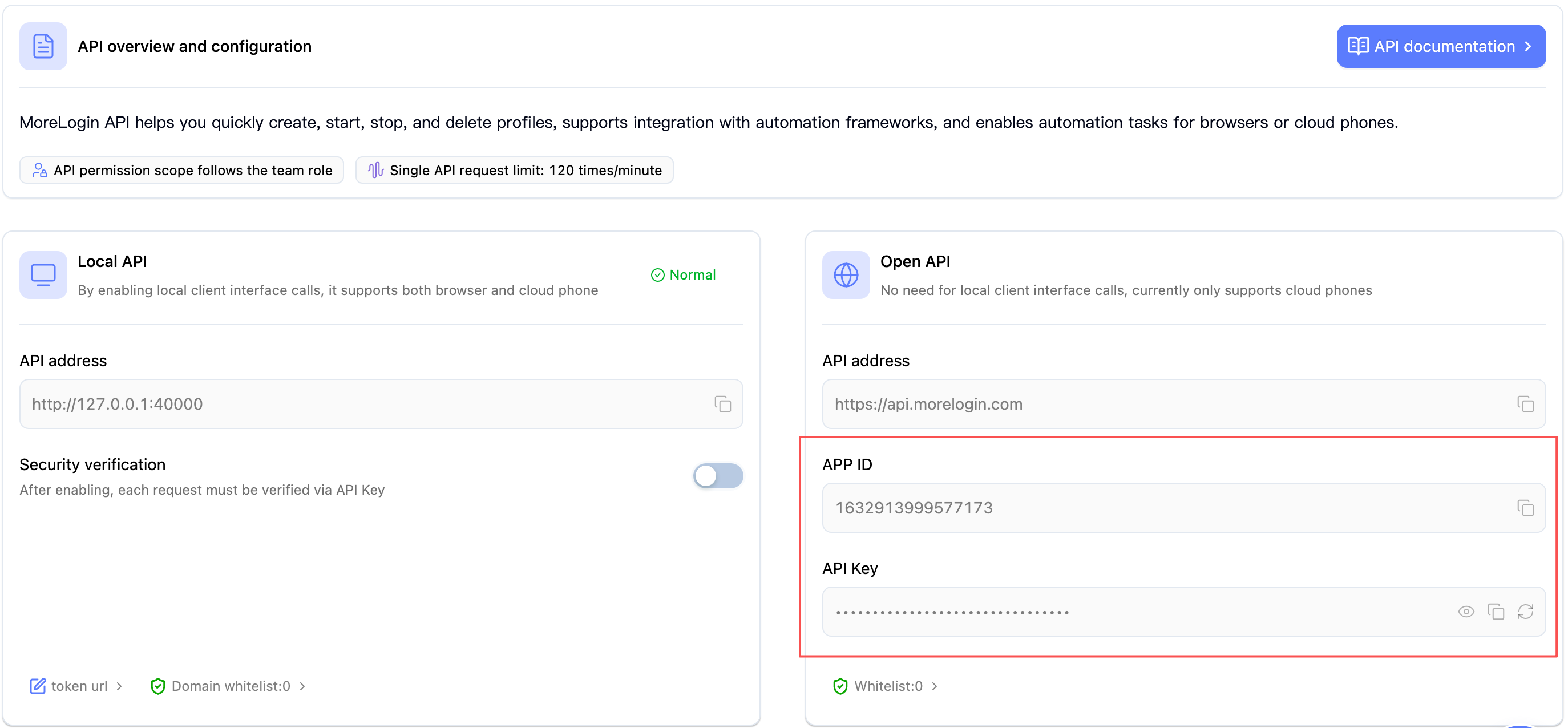
Open the MoreLogin desktop client (on any machine where you're logged in) and navigate to Settings → API & MCP. Copy the APP ID and API Key from the Open API section:
Call the login endpoint with your credentials:
curl -X POST http://127.0.0.1:40000/api/user/login \
  -H "Content-Type: application/json" \
  -d '{
    "apiId": "YOUR_APP_ID",
    "apiKey": "YOUR_API_KEY"
  }'
A successful response looks like:
{"code": 0, "msg": null, "data": true}Confirm the API is ready by listing browser profiles:
curl -s -X POST http://127.0.0.1:40000/api/env/page \
  -H "Content-Type: application/json" \
  -d '{"pageNo": 1, "pageSize": 1}'
A
{"code":0, ...}response means you are logged in and the API is ready.
Checkpoint: Your MoreLogin server is fully operational. Proceed to Step 4 for remote access, or jump directly to Step 5 if running scripts on the same server.
[!NOTE] The login session persists as long as the MoreLogin process is running. If you restart the AppImage, you will need to log in again.
By default, both the Local API (:40000) and CDP debug ports bind to 127.0.0.1. If you need to access them from an external machine (e.g., your development laptop), use socat to forward traffic.
[!WARNING] Security risk — do not expose these ports to the public internet.
- The Local API has no built-in authentication for most endpoints.
- A CDP debug port grants full remote control of the browser instance (read cookies, inject scripts, capture screenshots).
Recommendations:
- Use an SSH tunnel instead of socat for remote access:
ssh -L 40000:127.0.0.1:40000 user@server- If you must use socat, restrict access with firewall rules to specific IPs only
- Use a VPN or cloud provider security groups to limit inbound traffic
- Never open ports
40001/ CDP ports to0.0.0.0on a public-facing server without IP restrictions
nohup socat TCP-LISTEN:40001,fork,reuseaddr,bind=0.0.0.0 TCP:127.0.0.1:40000 &External machines can now reach the API at
http://<server-ip>:40001.
When you start a browser profile via the API, the response includes a dynamic debugPort (e.g., 9222). Each profile may receive a different port. Forward it so external automation tools (Playwright, Puppeteer, Selenium) can connect:
# Example: if debugPort=9222, forward to external port 9223 (debugPort + 1)
# Adjust both ports to match the actual debugPort returned by /api/env/start
nohup socat TCP-LISTEN:9223,fork,reuseaddr,bind=0.0.0.0 TCP:127.0.0.1:9222 &
[!WARNING] When running multiple profiles concurrently, ensure forwarded ports do not collide with other profiles' debug ports. For example, if profile A gets
debugPort=9222and you forward to9223, but profile B receivesdebugPort=9223, there will be a port conflict. Consider using a larger offset or a dedicated port range.
[!TIP] In production, create socat forwarding dynamically after each
/api/env/startcall, using the returneddebugPort. See the Python example for a working implementation.
If running automation scripts on the same server, you can skip socat and connect directly to
127.0.0.1.
If you use socat, restrict access to trusted IPs only:
# Allow only a specific IP (recommended)
sudo ufw allow from <YOUR_IP> to any port 40001 proto tcp
sudo ufw allow from <YOUR_IP> to any port 9223 proto tcp

# Or allow from any IP (NOT recommended for production)
# sudo ufw allow 40001/tcp
# sudo ufw allow 9223/tcpFor the most secure remote access, use an SSH tunnel — no firewall changes or socat needed.
Because the CDP port is dynamic (assigned when you start a profile), the workflow is:
Tunnel the API port first:
# Run this on your local machine
ssh -L 40000:127.0.0.1:40000 user@<server-ip>
Start the profile via the tunneled API (
http://127.0.0.1:40000/api/env/start) and read the returneddebugPort.Open a second tunnel for the CDP port:
# Replace <debugPort> with the actual port returned by the API
ssh -L <debugPort>:127.0.0.1:<debugPort> user@<server-ip>
Connect to
http://127.0.0.1:<debugPort>from your local Playwright / Puppeteer scripts as if the server were local.
[!TIP] You can combine both tunnels in one command if you know the port range in advance, e.g.:
ssh -L 40000:127.0.0.1:40000 -L 9222:127.0.0.1:9222 -L 9223:127.0.0.1:9223 user@<server-ip>But in practice it's easier to start the API tunnel first, then add per-profile tunnels as needed.
Below is a minimal Python example showing the full lifecycle of a browser profile. For the complete production-ready script with concurrency and error handling, see the full example on GitHub.
pip install requests playwrightPlaywright is used here only for its CDP client (
connect_over_cdp). You do not need to runplaywright install— MoreLogin provides its own browser.
On Linux Server, the browser engine must run with the --no-sandbox flag. You pass this via the startupParams field when creating or updating a browser profile.
[!CAUTION] Without
--no-sandbox, the browser will fail to launch on most Linux server environments (especially those running asrootor lacking a full desktop session).
Use /api/env/create/advanced to create a profile with startupParams (the /api/env/create/quick endpoint does not support this field):
curl -X POST http://127.0.0.1:40000/api/env/create/advanced \
  -H "Content-Type: application/json" \
  -d '{
    "browserTypeId": 1,
    "operatorSystemId": 5,
    "startupParams": ["--no-sandbox"]
  }'
[!TIP] If you used
/api/env/create/quickto create the profile, call/api/env/updateafterwards to add--no-sandboxbefore starting it — see below.
If you already have browser profiles that were created without --no-sandbox, update them before starting:
curl -X POST http://127.0.0.1:40000/api/env/update \
  -H "Content-Type: application/json" \
  -d '{
    "envId": "YOUR_ENV_ID",
    "startupParams": ["--no-sandbox"]
  }'
[!NOTE] The
startupParamsfield accepts an array of strings. You can include other Chrome flags here as well (e.g.,["--no-sandbox", "--disable-gpu"]). The--no-sandboxflag is only required on Linux — Windows and macOS profiles do not need it.
This example assumes the script runs on the same server as MoreLogin. For remote scenarios, see the notes after the code.
import requests
from playwright.sync_api import sync_playwright

# ── Configuration ──────────────────────────────────────────
# Local:  script runs on the SAME server as MoreLogin
# Remote: script runs on a DIFFERENT machine — see notes below
API_BASE  = "http://127.0.0.1:40000"


# ① Create a browser profile
resp = requests.post(f"{API_BASE}/api/env/create/quick", json={
    "browserTypeId": 1,
    "operatorSystemId": 5,
    "quantity": 1
})
resp_data = resp.json()
assert resp_data["code"] == 0, f"Create failed: {resp_data}"
env_id = resp_data["data"]["envIds"][0]
print(f"✅ Created profile: {env_id}")


# ①-b Add --no-sandbox (required on Linux Server)
resp = requests.post(f"{API_BASE}/api/env/update", json={
    "envId": env_id,
    "startupParams": ["--no-sandbox"]
})
resp_data = resp.json()
assert resp_data["code"] == 0, f"Update failed: {resp_data}"
print(f"✅ Set --no-sandbox for profile: {env_id}")


# ② Start the profile (headless)
resp = requests.post(f"{API_BASE}/api/env/start", json={
    "envId": env_id
})
resp_data = resp.json()
assert resp_data["code"] == 0, f"Start failed: {resp_data}"
debug_port = resp_data["data"]["debugPort"]   # Dynamic — different for each profile
print(f"✅ Started — debug port: {debug_port}")


# ③ Build the CDP URL
cdp_url = f"http://127.0.0.1:{debug_port}"


# ④ Connect via CDP and automate
with sync_playwright() as p:
    browser = p.chromium.connect_over_cdp(cdp_url)
    page = browser.contexts[0].pages[0]
    page.goto("https://www.google.com")
    page.screenshot(path=f"screenshot_{env_id}.png")
    print(f"✅ Screenshot saved")
    # Use disconnect() — not close() — to detach without killing the browser.
    # The profile will be stopped cleanly via the API in step ⑤.
    browser.disconnect()


# ⑤ Stop the profile
requests.post(f"{API_BASE}/api/env/close", json={"envId": env_id})
print(f"✅ Profile stopped")


# ⑥ Delete the profile
requests.post(f"{API_BASE}/api/env/remove", json={"envIds": [env_id]})
print(f"✅ Profile deleted")
[!NOTE] Running from a remote machine? Two approaches:
Option A — SSH tunnel (recommended): Set up SSH tunnels from your local machine to the server (see § 4.4), then keep
API_BASE = "http://127.0.0.1:40000"andcdp_url = f"http://127.0.0.1:{debug_port}"— SSH makes the remote ports appear local.Option B — socat on the server: On the server, start socat forwarding for the API port and for each CDP port:
# Run these on the SERVER, not on your local machine
socat TCP-LISTEN:40001,fork,reuseaddr,bind=0.0.0.0 TCP:127.0.0.1:40000 &
socat TCP-LISTEN:$((debug_port+1)),fork,reuseaddr,bind=0.0.0.0 TCP:127.0.0.1:$debug_port &
Then in your script, set
API_BASE = "http://<server-ip>:40001"andcdp_url = f"http://<server-ip>:{debug_port + 1}". ⚠️ Restrict access with firewall rules — see § 4.3.
[!IMPORTANT] The
resp.json()["data"]["envIds"]structure matches the current/api/env/create/quickresponse format. If you encounter a different shape (e.g.,data: ["id1", ...]), check the API Reference for your version — response formats may vary across releases.
The following results were obtained on an Ubuntu 24.04 Server VM (8 vCPU, 8 GB RAM) using the full stress test script:
| Metric | Value |
|---|---|
| Total runs | 100 |
| Concurrency | 4 (simultaneous) |
| Success rate | 100.0% |
| Total time | 604.06 s |
| Avg time per task | 6.04 s |
| Throughput | 0.17 tasks/s |
These numbers serve as a baseline. Actual performance depends on server specs, network conditions, and page complexity.
For production servers, run MoreLogin as a systemd service to get automatic startup on boot, restart on crash, and centralized logging.
sudo tee /etc/systemd/system/morelogin.service > /dev/null <<'EOF'
[Unit]
Description=MoreLogin Browser (headless)
After=network-online.target
Wants=network-online.target

[Service]
Type=simple
User=root
WorkingDirectory=/opt/morelogin
ExecStart=/usr/bin/xvfb-run -a /opt/morelogin/MoreLogin_x86_64_2.54.0.AppImage --no-sandbox
Restart=on-failure
RestartSec=10
StandardOutput=journal
StandardError=journal

[Install]
WantedBy=multi-user.target
EOF
Adjust
WorkingDirectoryandExecStartpaths to match where you placed the AppImage.
[!TIP] For production, consider creating a dedicated user (e.g.,
morelogin) instead of running asroot, and adjust file ownership and permissions accordingly. If the AppImage currently requires root privileges, you may keepUser=root, but isolating the process under a non-root account is a best practice.
sudo systemctl daemon-reload
sudo systemctl enable morelogin    # Auto-start on boot
sudo systemctl start morelogin # Start nowsudo systemctl status morelogin # Check status
sudo journalctl -u morelogin -f # Stream logs
sudo systemctl restart morelogin # Restart
sudo systemctl stop morelogin # Stop[!NOTE] After a restart, you must call the login endpoint again — the API session does not survive process restarts. For automated recovery, consider adding an
ExecStartPostscript or a health-check cron job that calls the login endpoint after the service starts.
AppImages require FUSE to run.Fix: Install FUSE support:
sudo apt install -y libfuse2t64Fix: Install the font package for the target language (see Step 1 — Install Fonts).
Cause: CDP debug ports bind to 127.0.0.1 by default.
Fix: Set up socat forwarding (see Step 4) and ensure firewall rules allow the forwarded port.
Cause: MoreLogin hasn't finished starting yet, or the process crashed.
Fix:
- Wait 5–10 seconds after startup
- Check
morelogin.logfor errors - Verify the process is running:
ps aux | grep MoreLogin
{"status": "error", "code": 401, "message": "Your login status has expired, please log in again"}Cause: You haven't logged in via the API, or the MoreLogin process was restarted.
Fix: Call the login endpoint before any other API call (see Step 3).
| Goal | Link |
|---|---|
| Full Browser API reference | Browser API |
| Authentication setup | Authentication Guide |
| Playwright / Selenium / Puppeteer examples | Automation Examples |
| Complete Linux stress test script | GitHub — linux_server_test.py |
| CLI quick start | CLI Guide |